Billing software for restaurants
Take orders by table, send KOTs to the kitchen printer, and print a proper GST bill with a UPI QR. Waiters can order from an Android phone.
Made for restaurants
A family restaurant runs on three things at once: guests at the tables, orders in the kitchen and money at the counter. DeviPOS is restaurant billing software that keeps all three in step, on the Windows PC you already have and on an Android phone for your waiters.
Every order goes to the kitchen as a KOT, every bill is a proper GST bill with CGST and SGST, and every rupee is counted at day-end. Nothing depends on the internet, so a slow connection on a busy Saturday night never stops the counter.
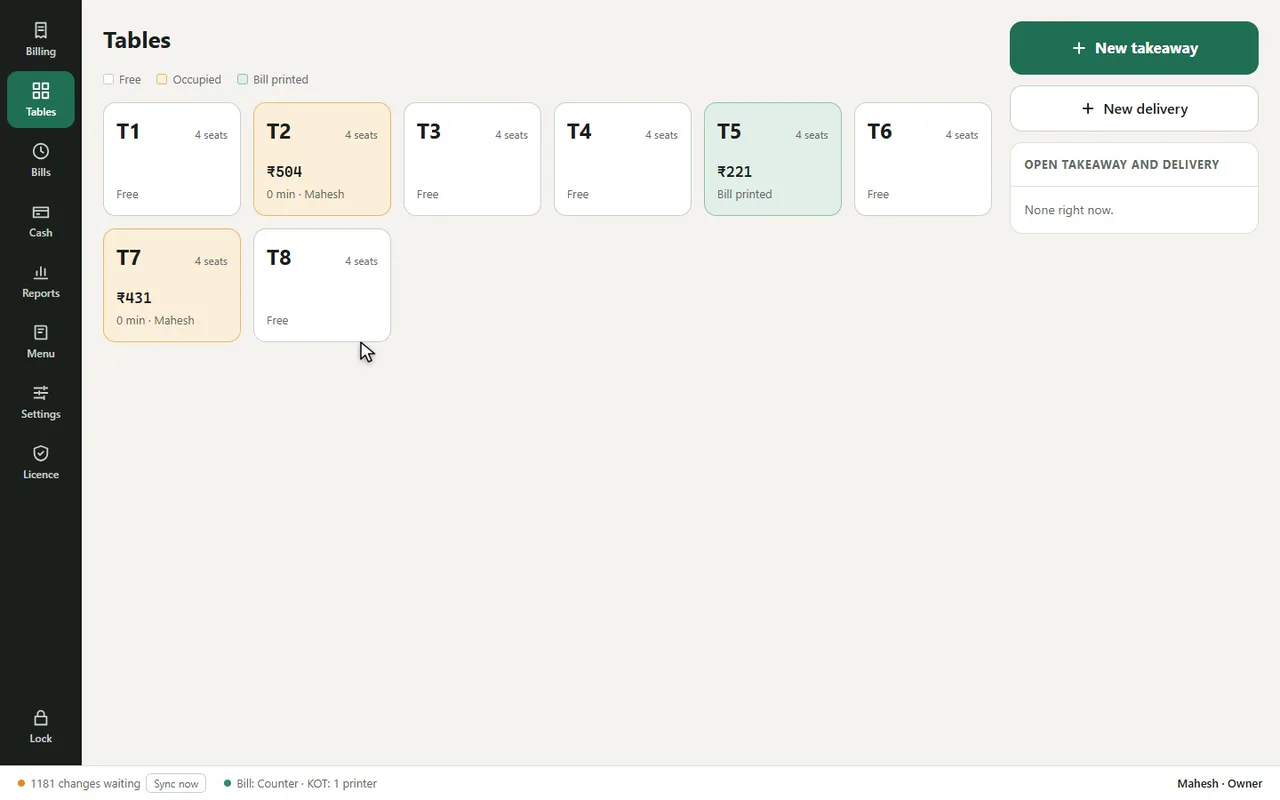
Every table at a glance
Free, occupied or bill printed. Move or merge tables in one step.
KOT to the kitchen
The kitchen printer prints each order the moment it is sent. Removed items print a cancel KOT.
Waiters on a phone
Orders from the table reach the counter PC within seconds.
What changes at your counter
Orders lost between floor and kitchen
Waiters shout or write on paper, items get missed and guests wait. With DeviPOS each order prints in the kitchen as a numbered KOT, with table, items, quantities and notes.
Items quietly removed after cooking
A cooked item taken off the bill is money lost. In DeviPOS, removing a sent item needs a reason and a manager PIN, prints a cancel KOT and is written to the activity log.
Long queue at the cash counter
Bills take time when the cashier types every item. Here the bill is already built from the KOTs: print it, show the UPI QR, settle.
No idea which dishes really sell
Reports show sales by item, category, staff and hour, so you know what to push and what to drop from the menu.
Run the floor from one screen
See which tables are waiting, how long they have been open and what they owe.
- Service charge you can remove when a guest asks
- Discounts above 10% need a manager PIN
- Split payment: part cash, part UPI
From opening to closing
Open
Count the opening cash and enter it. Staff sign in with their own 4-digit PIN.
Lunch rush
Waiters take orders at the table on the phone or the counter PC. KOTs print in the kitchen straight away.
Billing
Print the GST bill, add or remove the service charge, and settle by cash, UPI, card or split.
Close
Count the drawer at day-end. DeviPOS shows what it should be and prints a summary for the owner.
Punjabi, Chinese, South Indian and more
Tick what you serve from the ready menu and set your prices.
Common questions
Can I use my existing kitchen printer?
Yes, any thermal printer with a Windows driver. Set one printer for bills and one for KOTs.
Can two people take orders at once?
Yes. Your licence covers two devices, for example the counter PC and a waiter’s phone.
Can I move a table to another table?
Yes. Move an order to a free table, or merge two tables into one bill, in one step.
Can I add a service charge?
Yes. Set the service charge % once; it is added on dine-in bills and can be removed for a guest.
Do you show CGST and SGST on the bill?
Yes. GST is worked out per item rate and shown as CGST and SGST, with your GSTIN on the bill.
Does it work if the internet is slow?
Yes. Billing, KOTs and printing do not need the internet. Bills are backed up to the cloud when it is back.
DeviPOS for other food businesses
See DeviPOS on your own menu
A free demo at your restaurant or on a video call. You can be billing the same day.